
Project Commercial Intelligence
Know where every project is going — before it gets there.
Hourline forecasts the hours, cost and margin on every contract you sell or buy by the hour. It shows which ones are heading off course and what to do about it, while there is still time to act.
- Data hosted in the UK
- Two-step login and company single sign-on
- One-month pilot on your own contracts
Your systems record what happened. Hourline shows what happens next.
Timesheets, the sales system and the finance system each hold part of the picture. Hourline sits above them and answers the three questions they leave open.
-
Will the hours run out before the work does?
A forecast at completion for every contract, and the week the contracted hours are due to run out.
-
Is the margin we agreed still the margin we will get?
Forecast revenue, spend and margin against the plan, broken down by role, by phase and by supplier.
-
Which contract needs a conversation this week?
Every project and contract ranked by risk, each with a recommended next step written in plain English.
The forecast
A forecast you can question
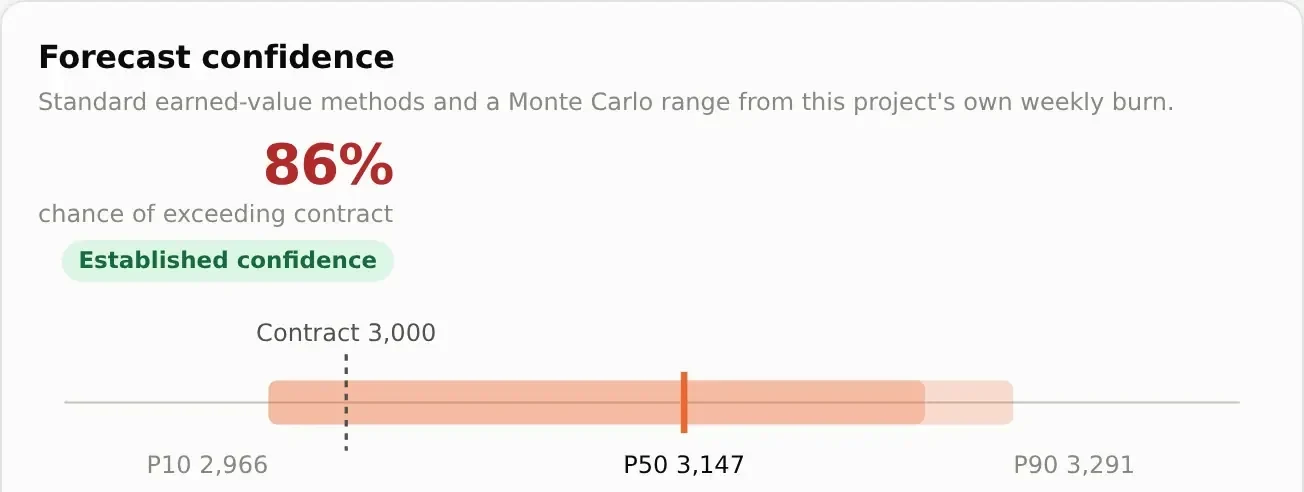
Hourline shows its working. Every figure can be traced back to the hours your own people recorded.
-
A likely range, not a single number
Hourline replays the rest of each project 2,000 times using its own week-by-week record, then shows the range the outcome is likely to fall in.
-
It says how sure it is
Each range is labelled low, developing or established confidence, depending on how many weeks of evidence stand behind it.
-
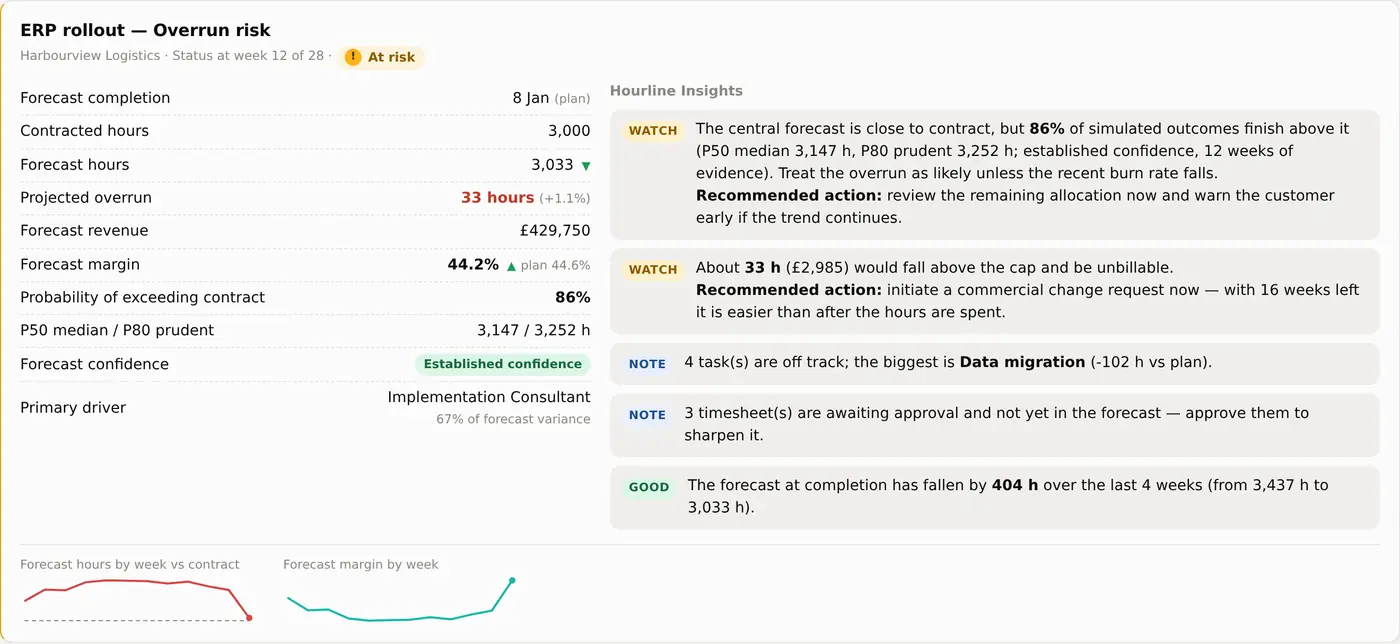
An early-warning score with nothing hidden
A score from 0 to 100 for each project. Every signal shows its reading and the points it adds.
-
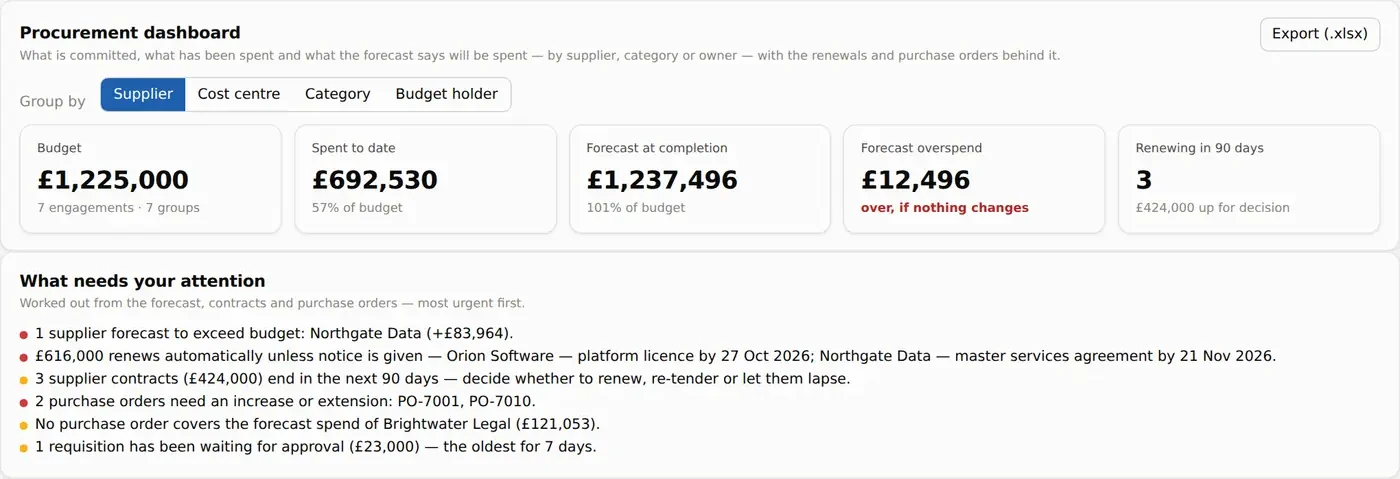
Insights that end with an action
Short statements of what is likely to happen next, most urgent first. They come from clear rules applied to your own data, and nothing leaves Hourline to produce them.
How it works
From contract to forecast in four steps
-
Set up the contract
Enter the hours, rates, roles and dates. Start from one of your own templates, or import the task list from Excel.
-
Plan the hours
Spread the hours by task, role and week. Hourline can fill in the plan for you from a standard pattern.
-
Record what is used
People log their time and managers approve it. You can also upload timesheets from a file.
-
See where it is heading
The forecast updates as the hours come in, for one contract, the whole portfolio and the leadership view.
For professional services
For firms that sell their time
Consultancies and services teams delivering fixed-hours and time-and-materials contracts for their clients.
-
Hours, revenue and margin
A forecast for every project, set against what was sold.
-
Overruns caught early
See which role is driving an overrun and the week the hours run out, in time to raise a change request.
-
Timesheets with approval
People see only their own work. Rates, costs and revenue stay hidden from them.
-
Portfolio and leadership view
Every project ordered by risk and by margin at risk. A ready agenda for the weekly review.
-
Client contracts and renewals
Know before the renewal meeting whether the hours will run out early or be left unused.
-
Works with Salesforce
Opportunities arrive in Hourline as projects, with the roles they need.
For procurement
For teams that buy time from suppliers
Procurement teams looking after supplier contracts that are used up in hours: consultancies, contractors and managed services.
-
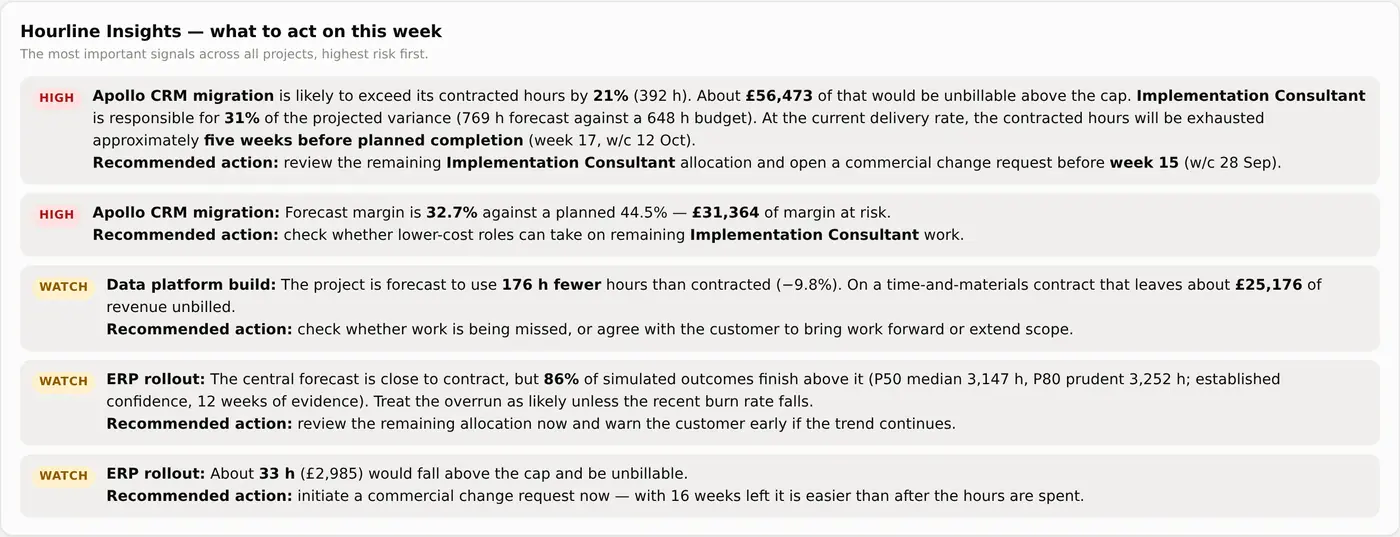
Spend and exposure in one view
Budget, spend to date and forecast spend, grouped by supplier, category, cost centre or budget holder.
-
Renewals you see coming
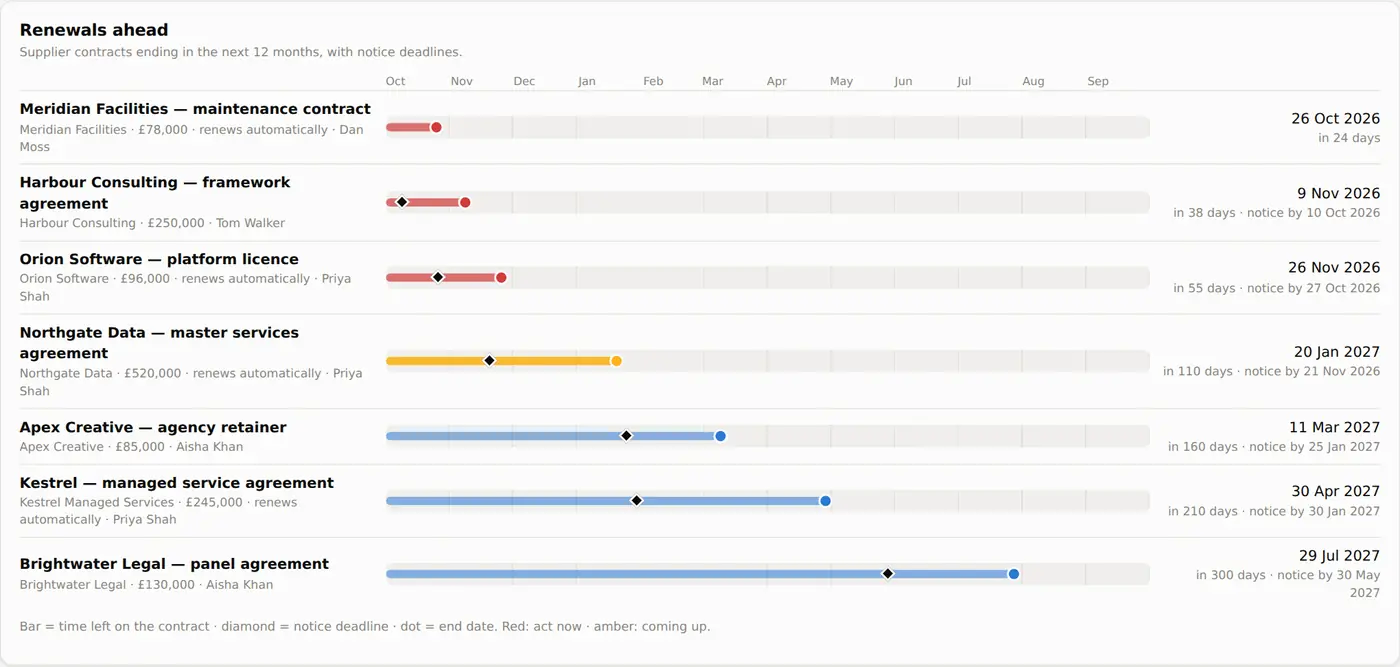
Reminder emails ahead of every end date and notice deadline, so no contract renews by accident.
-
A forecast for each supplier
Hours contracted, used and remaining, and the week the hours or the purchase order will run out.
-
Requests and approvals
Purchase requests move through clear approval stages. Every step records who made it and when.
-
Purchase orders kept in step
Orders are checked against forecast spend. Approved requests export in the layout NetSuite imports.
-
Signature status in view
Record where each contract is in DocuSign and who it is waiting on.
Other teams
Set up for the way your organisation works
Each workspace has its own modules, wording and fields, so people see only what applies to them. The user guide is written for your workspace too.
-
Internal IT and project offices
IT departments and project offices running internal projects against budgeted hours.
-
HR and contingent workforce
HR and resourcing teams managing contractor and agency assignments.
-
Something else
If your organisation agrees work in hours, Hourline can be set up for it. Tell us how you work when you book a demo.
Security
Ready for your security review
Rates, costs and margins are sensitive. Hourline is built to keep them inside your organisation.
A security overview, data processing agreement and completed security questionnaire are available on request. Contact [email protected].
- Stored in the UK
- Your data is held in London, encrypted in transit and at rest, and backed up every day.
- Kept separate
- Each customer's data is isolated by the database itself, not only by the screens.
- Strong sign-in
- Two-step login, and single sign-on through Microsoft Entra ID, Okta or Google Workspace.
- Invitation only
- Nobody gets in without an invitation. Four roles control who sees rates, costs and revenue.
- A record of changes
- Membership, settings, project and timesheet events are logged, and your administrators can export the log.
- Your data stays yours
- Export everything at any time. No trackers, analytics or advertising in the app.
Pilot
Try it for a month on your own contracts
A pilot shows you what Hourline says about work you already know well, before you decide anything.
We set up your workspace
With the modules and wording that fit your organisation.
You load a few live contracts
Type them in, import them from Excel, or start from a template.
You record a few weeks of hours
Through timesheets or a file upload.
You see where each one is heading
And judge the forecast against what you know.
Book a demo
See Hourline with examples that match your work
Tell us a little about your organisation and we will arrange a 30-minute walkthrough.
- You send this form.
- We reply by email to agree a time.
- We walk you through Hourline, set up for your kind of organisation.
Thank you. Your request has been sent.
We will reply by email to agree a time for your demo.